SPI
This chapter covers device tree configuration, loopback testing, and communication with Python and C in Luckfox Lume SPI master mode.
1. SPI Subsystem
The Linux SPI subsystem is a core driver framework that manages and controls peripherals connected to SPI buses. Detailed documentation is available in the kernel source under <Linux_kernel_source>/Documentation/spi.
The SPI subsystem has two main components:
- sysfs interface
The SPI subsystem exposes files and directories through sysfs to configure and manage SPI buses and devices. Relevant nodes are located under
/sys/class/spi_masterand/sys/bus/spi/devices. User-space applications can use this interface to read and modify SPI device attributes. - User-space device nodes
Each registered SPI device creates a corresponding character device node under
/dev, allowing applications to exchange data with peripherals through standard file I/O. Device nodes are generally named/dev/spidevX.Y, whereXis the SPI bus number andYis the chip-select device number on that bus.
2. SPI Testing (Shell)
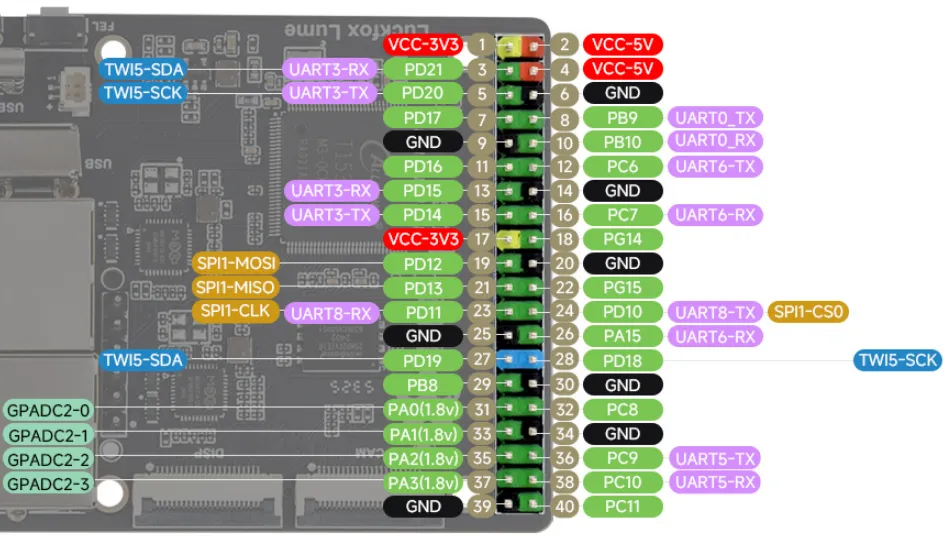
2.1 Pinout
| SPI | CLK | MISO | MOSI | CS |
|---|---|---|---|---|
| SPI1 | Physical pin 23 / PD11 | Physical pin 21 / PD13 | Physical pin 19 / PD12 | CS0: Physical pin 24 / PD10 |
2.2 Device Tree Configuration
-
Board-level device tree path:
device/config/chips/t153/configs/luckfox_lume/linux-5.10-origin/board.dts -
Configure the SPI1 master and CS0 slave device as follows:
&spi1 {pinctrl-0 = <&spi1_pins_default &spi1_pins_cs>;pinctrl-1 = <&spi1_pins_sleep>;pinctrl-names = "default", "sleep";sunxi,spi-bus-mode = <SUNXI_SPI_BUS_MASTER>;sunxi,spi-cs-mode = <SUNXI_SPI_CS_AUTO>;clock-frequency = <150000000>;sunxi,spi-num-cs = <1>;status = "okay";spidev@0 {compatible = "rohm,dh2228fv";reg = <0>;spi-max-frequency = <150000000>;spi-rx-bus-width = <1>;spi-tx-bus-width = <1>;status = "okay";};}; -
Compile the device tree:
sudo ./build.sh dts
2.3 Buildroot
-
Add spidev in the buildroot directory. Search for the keyword "spidev".
cd <Luckfox_Lume_SDK>/./build.sh buildroot_menuconfig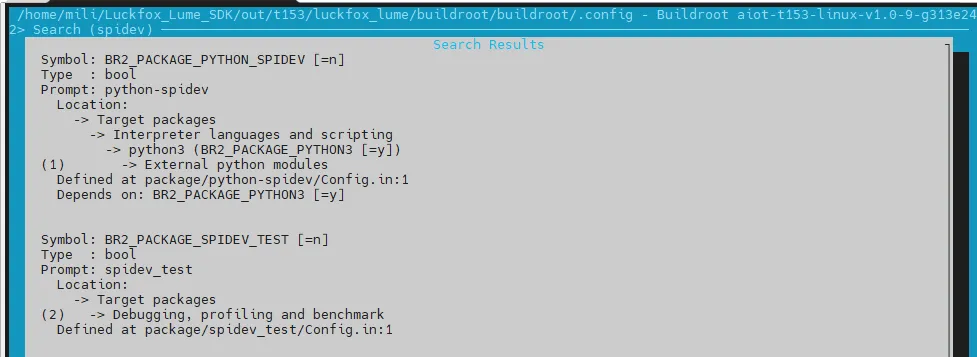
-
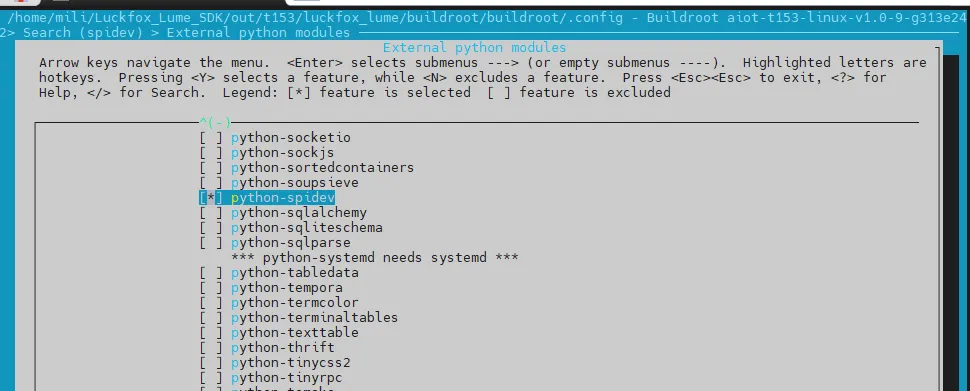
Select "spidev" in the search results, then save and exit.
-
Build:
sudo ./build.shsudo ./build.sh pack
2.4 Viewing Devices
root@luckfox:~# ls /dev/spidev*
/dev/spidev1.0
2.5 SPI Loopback Test
Use the test tool included in the kernel. Connect pin 19 (MOSI) to pin 21 (MISO) with a jumper wire:
cd <Luckfox_Lume_SDK>/
export PATH="$PWD/out/toolchain/gcc-linaro-11.3.1-2022.06-x86_64_arm-linux-gnueabihf/bin:$PATH"
arm-linux-gnueabihf-gcc \
    kernel/linux-5.10-origin/tools/spi/spidev_test.c \
    -o spidev_test
Copy the program to the board, confirm that MOSI and MISO are connected, then run it:
chmod +x spidev_test
./spidev_test -D /dev/spidev1.0 -s 1000000 -b 8 -p "hello Lume!" -v
Output:

3. SPI Testing (Python)
-
Example program:
#!/usr/bin/env python3import sysimport spidevdef main():tx_buffer = list(b"hello Lume!")spi = spidev.SpiDev()try:spi.open(1, 0)spi.max_speed_hz = 1_000_000spi.mode = 0spi.bits_per_word = 8rx_buffer = spi.xfer2(tx_buffer)print("tx_buffer:", bytes(tx_buffer).decode("ascii"))print("rx_buffer:", bytes(rx_buffer).decode("ascii", errors="replace"))if rx_buffer != tx_buffer:print("Loopback FAIL")return 1print("Loopback PASS")return 0except OSError as error:print(f"SPI error: {error}", file=sys.stderr)return 1finally:spi.close()if __name__ == "__main__":sys.exit(main()) -
Open the SPI device:
spi.open(1, 0)spi.max_speed_hz = 1_000_000spi.mode = 0spi.bits_per_word = 8rx_buffer = spi.xfer2(tx_buffer)Configure 1 MHz, Mode 0, and 8-bit words, then perform one full-duplex transfer.
xfer2()returns the received data. -
Run the program:
python3 SPI.pyOutput:

4. SPI Loopback Test (C)
-
Complete code:
#include <fcntl.h>#include <linux/spi/spidev.h>#include <stdint.h>#include <stdio.h>#include <stdlib.h>#include <string.h>#include <sys/ioctl.h>#include <unistd.h>int main(void){const char *device = "/dev/spidev1.0";uint8_t tx_buffer[] = "hello Lume!";uint8_t rx_buffer[sizeof(tx_buffer)] = {0};const size_t length = sizeof(tx_buffer) - 1;uint8_t mode = SPI_MODE_0;uint8_t bits = 8;uint32_t speed = 1000000;int spi_file = open(device, O_RDWR);if (spi_file < 0) {perror("Failed to open SPI device");return EXIT_FAILURE;}if (ioctl(spi_file, SPI_IOC_WR_MODE, &mode) < 0 ||ioctl(spi_file, SPI_IOC_WR_BITS_PER_WORD, &bits) < 0 ||ioctl(spi_file, SPI_IOC_WR_MAX_SPEED_HZ, &speed) < 0) {perror("Failed to configure SPI device");close(spi_file);return EXIT_FAILURE;}struct spi_ioc_transfer transfer = {.tx_buf = (uintptr_t)tx_buffer,.rx_buf = (uintptr_t)rx_buffer,.len = (uint32_t)length,.speed_hz = speed,.bits_per_word = bits,};int result = ioctl(spi_file, SPI_IOC_MESSAGE(1), &transfer);if (result < 0) {perror("Failed to perform SPI transfer");close(spi_file);return EXIT_FAILURE;}if (result != (int)length) {fprintf(stderr, "Incomplete SPI transfer: %d bytes\n", result);close(spi_file);return EXIT_FAILURE;}printf("tx_buffer: %s\n", (const char *)tx_buffer);printf("rx_buffer: %s\n", (const char *)rx_buffer);int matched = memcmp(tx_buffer, rx_buffer, length) == 0;puts(matched ? "Loopback PASS" : "Loopback FAIL");close(spi_file);return matched ? EXIT_SUCCESS : EXIT_FAILURE;} -
Open the SPI device:
int spi_file = open(device, O_RDWR);Open
/dev/spidev1.0for reading and writing. If opening fails, report the error and exit. -
Configure SPI:
ioctl(spi_file, SPI_IOC_WR_MODE, &mode);ioctl(spi_file, SPI_IOC_WR_BITS_PER_WORD, &bits);ioctl(spi_file, SPI_IOC_WR_MAX_SPEED_HZ, &speed);Set Mode 0, 8-bit words, and a 1 MHz clock. The complete program checks the return value of each configuration operation and does not transfer data if configuration fails.
-
Send and receive data:
int result = ioctl(spi_file, SPI_IOC_MESSAGE(1), &transfer);int matched = memcmp(tx_buffer, rx_buffer, length) == 0; -
Cross-compile:
export PATH="<Luckfox_Lume_SDK>/out/toolchain/gcc-linaro-11.3.1-2022.06-x86_64_arm-linux-gnueabihf/bin:$PATH"arm-linux-gnueabihf-gcc -Wall -Wextra -O2 SPI.c -o SPI -
Run the program:
chmod +x SPI./SPIOutput:
